Every Coding Agent Has a Different Idea of What "Deploy" Means
We wrote deploy guides for fifteen agents. The individual steps weren't so remarkable. The disagreements about network, sandbox and shipping were.
Ask four coding agents to deploy the same Dockerfile and you will get four confident answers that do not agree. One runs a command. One opens a pull request and waits for CI. One asks you to press Publish. One says the app is already live, because its machine has a public port. None is wrong. The agents are using one word to refer to four different things.
Over the last few months we wrote per-agent deploy guides for fifteen agents — install step, prompt, sandbox and network settings, gotchas. The steps were easy. The hard part was that "deploy" is not one capability but a stack of local conventions, and a cloud that wants every agent to deploy to it has to absorb those conventions.
Cloudish is our product, so this is not a neutral survey; it is what building an agent-deployable cloud taught us. All sources are listed with a checked date, because these products change quickly.
What "deploy" can mean
Run a command. Claude Code, Codex CLI, Cline, Aider and Gemini CLI deploy by executing something in a shell. Deploy is an outbound HTTPS request. If the sandbox cannot reach the host, the capability does not exist.
Open a pull request. GitHub's Copilot coding agent, Codex cloud and Cursor's cloud agents work in a repository and ship through a branch. Deploy is a commit, a CI run and a review. The agent writes the code on one machine; the app runs on another.
Press the platform's button. Replit and v0 own the runtime.
Operate a VM. Devin and OpenHands run the agent inside a machine they control. Deploy is a command in that machine, subject to the session's network policy.
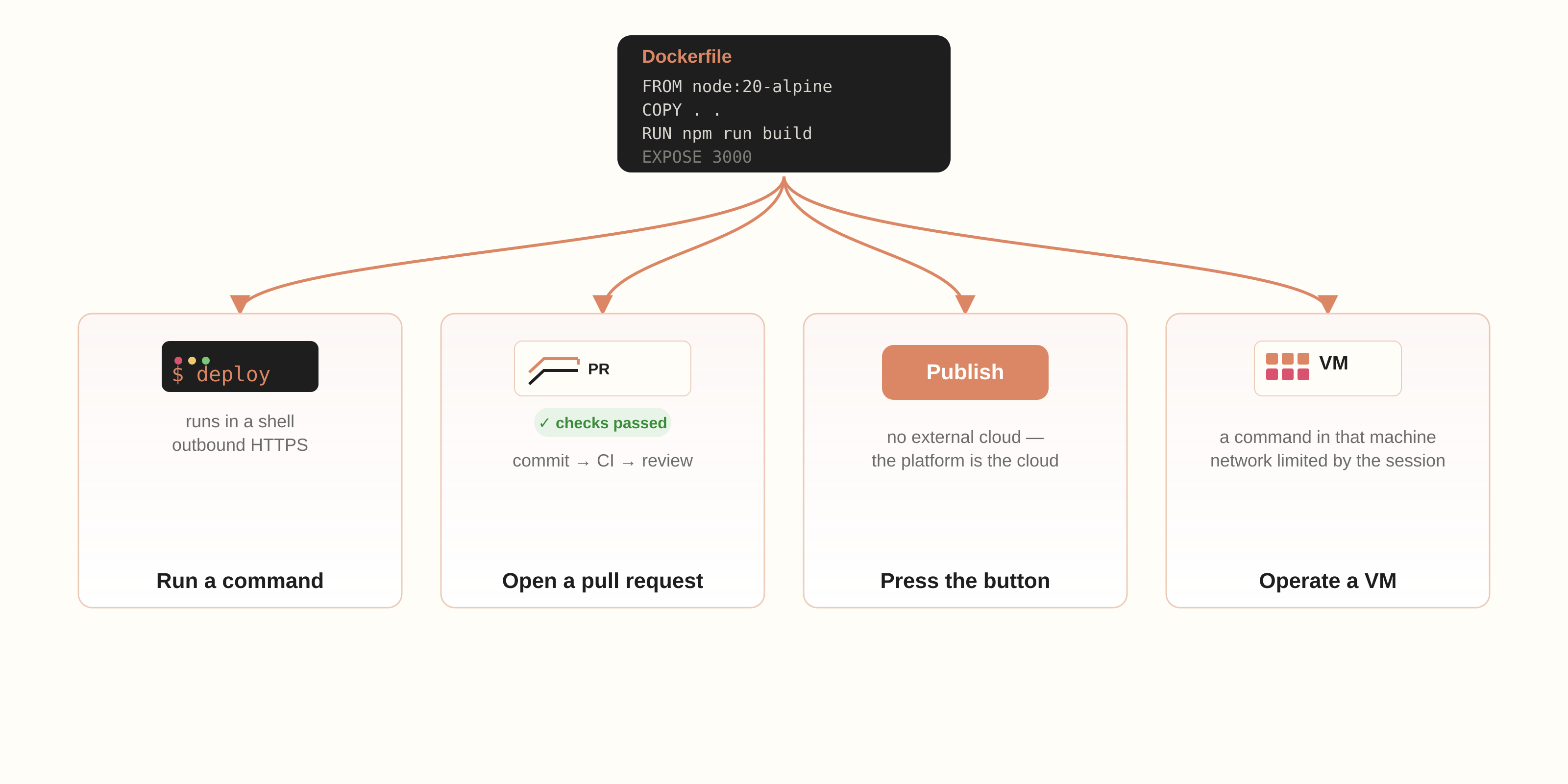
The same sentence — "deploy this app" — describes four contracts. A guide that ignores the difference fails in practice.
The first disagreement is network
Network access is where the definitions diverge most, and where most "works with your agent" claims quietly break.
Claude Code sandboxes shell commands with no direct route out when sandboxing is enabled. Traffic goes through a local proxy that checks each host, and the allowed-domain list starts empty; the first new host triggers a prompt. Tools that ignore proxy variables — ssh, most database drivers — fail even to allowed hosts. Our guide cannot just say "run this"; it says pre-allow cloudish.ai and cloudish.app, or approve the prompt.
Codex CLI is stricter by default: in workspace-write mode, network is off unless you enable it in the sandbox configuration. Codex cloud moves the decision into the environment — all public internet, package domains only, or additional allowed domains.
GitHub's Copilot coding agent runs behind a firewall . A recommended allowlist is on by default, and you add domains or URL rules in repository or organization settings. The firewall covers Bash-tool processes, not other MCP servers or setup steps.
Cursor cloud agents run in isolated VMs with three modes: allow all, default plus allowlist, allowlist only. Gemini CLI's container sandbox isolates the network and expects port mapping or a proxy. Cline gates commands with per-command approval, and Aider runs shell commands on request. Neither has a real sandbox, so the agent inherits your laptop's network.
"Has network access" is not a specification. The useful questions are: which hosts, at which layer, for which process — and does that process run the deploy?
The second disagreement is where the command runs
The install step hides the same split. Agents discover tools through files, not pages you publish: a skill is a folder with a SKILL.md whose description decides whether the body ever loads. We wrote that up in how an agent finds a tool . That is why one universal prompt does not exist, and why a tool installed on your laptop is not installed in a fresh cloud VM.
Secrets split the same way. An agent in an ephemeral VM cannot receive an email; a key pasted into a chat is a key in a transcript. Replit's production secrets are separate from the editor's; a Copilot firewall blocks an unknown host even when the key is valid. The agent needs a credential it can hold where the command runs.
And it needs proof. A dashboard is not a success signal for an agent. A build status it can poll, logs it can read, and a URL it can request are.
So what does "works with your agent" mean?
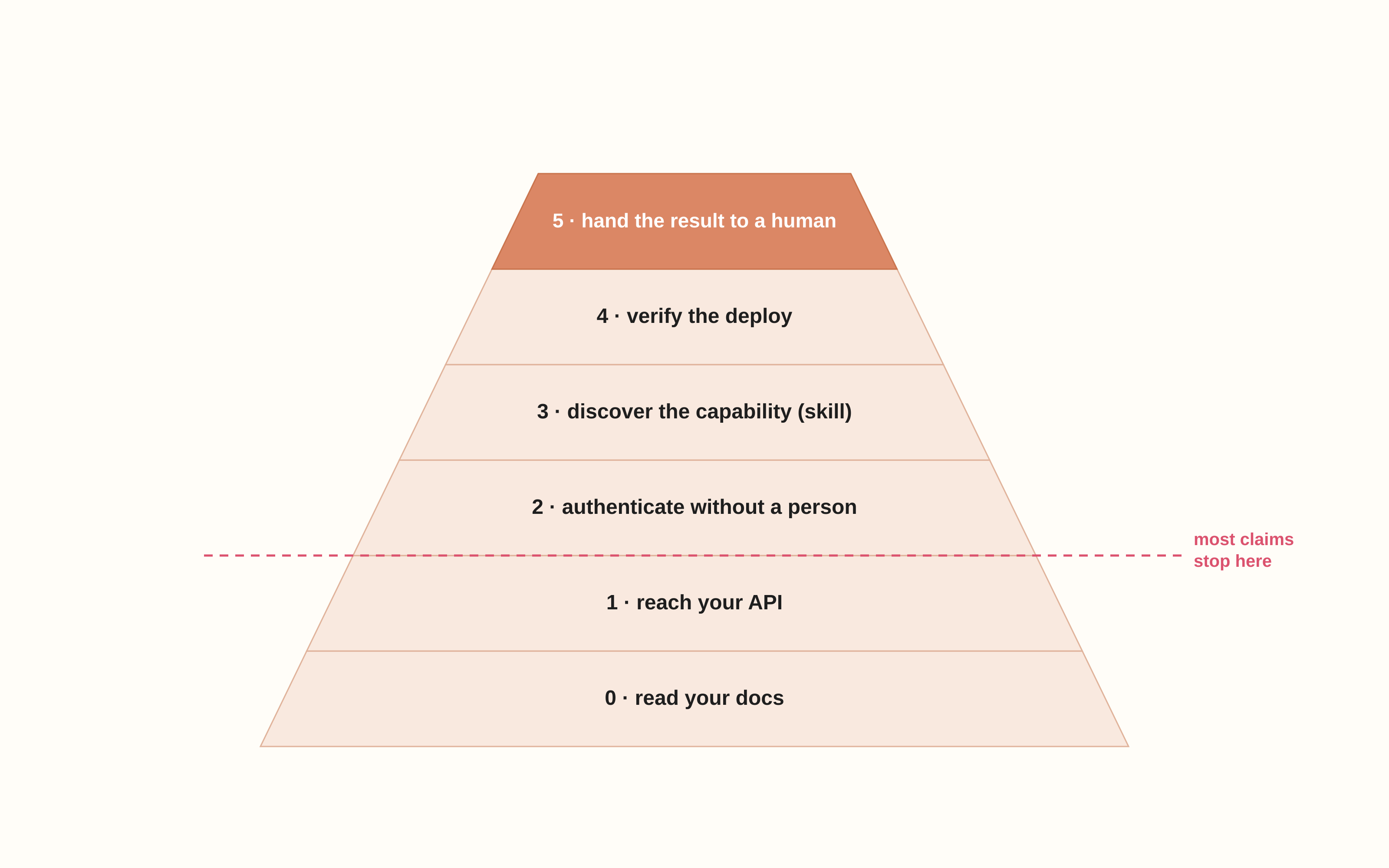
It is a pyramid, and most claims stop near the bottom.
- 0. It can read your docs.
- 1. It can reach your API through its network policy.
- 2. It can authenticate without a person — a key, no signup.
- 3. It can discover the capability at the right moment, through a skill.
- 4. It can verify the deploy — build status, logs, a URL.
- 5. It can hand the result to a human who owns it.
Before trusting an agent to deploy, check: can it reach the host from the process running the command; can it set a secret without printing it; does it have Docker, or must the build happen server-side; can it read a machine-readable success signal; what happens when the session ends? A local deploy dies with the laptop; a cloud VM is ephemeral. The URL has to outlive both.
What we changed in Cloudish
Those questions shaped the product. An agent creates a key with one POST and no signup, because an agent in a sandbox cannot fill a form. The key is prepaid, and child keys can be capped, because a credential in an environment variable deserves a hard ceiling, not a budget alert. Builds run server-side from a Dockerfile, because some sandboxes have no Docker daemon and some block registries. A deploy returns a pollable build status and a public URL, because an agent needs JSON, not a dashboard. Apps sleep when idle and wake on the next request. Instructions live in skill.md , because discovery is file-based and the description is the trigger.
None of that makes the agents agree. It makes their disagreement survivable.
One call instead of a definition
The guides are mechanical: install, prompt, allow the host, check the build. The argument underneath is not. "Deploy" will keep meaning different things in different products, and that is fine — each definition is coherent on its own terms.
Our experience at Cloudish is that the agent does not need a shared definition — it needs one call that bundles everything: an HTTPS request, a key the agent can hold and cannot overspend, a Dockerfile built on the server, and a URL plus status the agent can verify. That one call is what makes the handoff convenient, safe and reliable. The agent keeps its own definition of "deploy"; the cloud does not need to define it.
Sources
All links checked 18 November 2026.
- Claude Code sandboxing — network proxy, empty allowed-domain list, permission behaviour.
- Codex approvals and security — workspace-write network off by default.
- Codex cloud environments — internet access configured per environment.
- GitHub Copilot coding agent firewall — default allowlist, custom rules, scope.
- Cursor cloud agent network settings — allow all, default plus allowlist, allowlist only.
- Gemini CLI sandbox — container isolation, ports, proxy.
- Cline auto-approve — per-command approval, no true sandbox.
- Aider commands — shell commands run on request, no sandbox.
- Replit: publish your app — production deployment at its own URL.
- Replit secrets — production app secrets can differ from the editor's.
- v0 deployments — publish to a Vercel project.
- Devin security profiles — session network policy for shell and browser.
- OpenHands Docker runtime — agent server inside a container.
- How an agent finds a tool you wrote — file-based discovery and SKILL.md.
- Cloudish skill.md — keys without signup, server-side builds, scale to zero.